

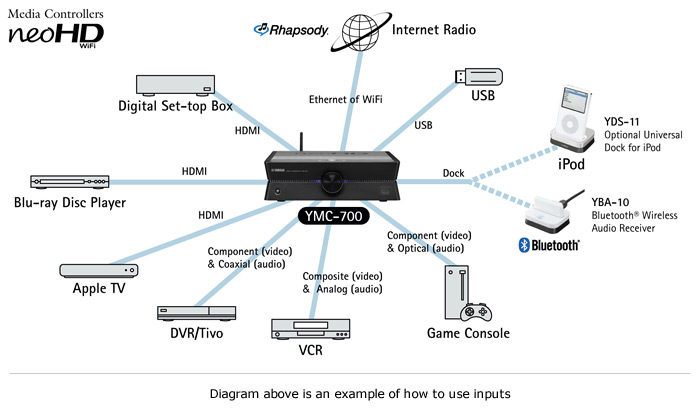
Not only can the Media Controllers seemlessly control a large number of sources, they can function as an IR remote junction. Three IR outputs allow wireless control of up to six other AV components. For example, the customer can operate a TV, a Blu-ray player and a game system using the neoHD remote control. A vast IR code library is built in, and the remote has sophisticated code-learning capability.
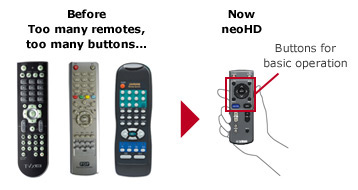
No more multiple remote controls sitting on the couch or coffee table. Now the customer needs only one! And people who are intimidated by large remote controls with many buttons will like this one. In addition to power, volume, channel and mute buttons, it has just a few others plus a cursor for making selections via the on-screen interface. The message is: "Not complicated! and Family friendly!"
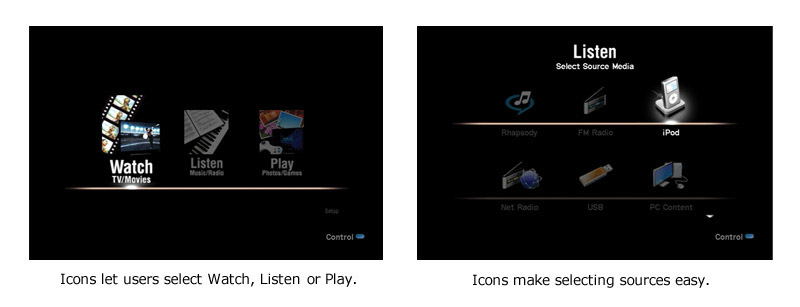
In keeping with the overall design concept, the GUI (graphical user interface) is clean and simple, with cool, minimal graphics. It provides activity-based operation, which is more natural than just selecting from text menus. The user simply selects Watch, Listen or Play using the remote cursor, then chooses the desired source. All the other menus, such as song lists, are also easy to view, understand and make selections from. In addition, this attractive GUI provides high quality images, such as iPod or Rhapsody album cover art.
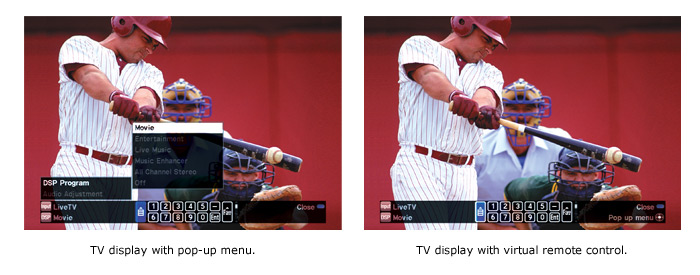
neoHD can display pop-up menus and a virtual remote control* on the bottom of the screen. They are unobtrusively overlaid on top of what is on the screen. The pop-up menus provide quick access to various functions. The virtual remote control makes it easier to control connected components.
* When the virtual remote control menu is displayed, the cursor keys on the remote operate the virtual remote control. When virtual remote control is off, the cursor keys control the source device.